

A change in payout account or sudden password reset can damage customers’ and partners’ perception of an organization. Such actions, such as cybersecurity threats, may lead to breaches of personal, account, or business data. The company’s ability to ensure trust is based on several factors. Beyond having the necessary cybersecurity infrastructure, organizations should invest effort in protecting account information, personal data, and business data. Partners’ and customers’ trust is also affected by the company’s control over other companies it uses and how it communicates issues and problems. Cybersecurity aspects serve to protect data and provide a guarantee for customers and partners.
Why Security Shapes Business Relationships
Affiliates rely on precise calculations of their commissions and the security of their referrals. SaaS customers can store contracts, invoices, and company documents on a provider’s platform.
When an account is taken over, trust can suffer. Even after the account is recovered, the affected person may still wonder if the problem has been fully fixed.
This is why cybersecurity matters for customer trust. The security practices should match what the business promises, including who can access data and how unusual account activity is checked.
Protect User, Customer, and Affiliate Accounts
SaaS account security should cover logins, account recovery, and important account changes. A strong password alone may not be enough if a support agent resets the account without first confirming the user’s identity.
Strengthen Login and Account Recovery
Use a different password for every account and consider using a password manager. Multifactor authentication requires another form of verification before you’re granted access, and passkeys and security keys are more secure than text-based passwords and protect against phishing.
Business email accounts also need protection because recovery messages may be sent there. When someone asks to recover an account, staff should verify their identity using set checks instead of information that anyone can find online.
Limit Access and Verify Changes
Give each staff member an account with only the access needed for their work. Take away access when an employee leaves, or a partner agreement ends.
Payout changes in affiliate marketing need extra care. Ask for another form of verification before making a change and send a notice to a trusted contact address or phone number.
Prevent Phishing and Credential-Based Attacks
Phishing protection helps stop fake messages and websites that try to steal login details. Attackers may also use passwords taken from other websites to break into accounts.
Recognize Fake Requests
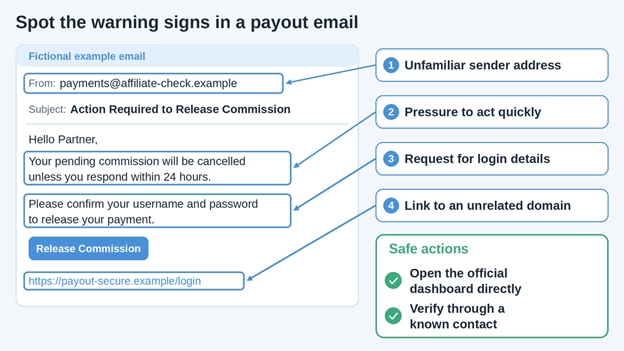
A message saying that commission payments are on hold may send an affiliate to a fake login page. A fake subscription notice can use the same trick to target SaaS customers.
Check payment requests through the official dashboard or a trusted contact before taking action.
Reduce Password-Related Risks
Never use the same password twice, watch for unusual logins, and make it easy for users to report questionable messages. Unusual login patterns should be investigated, but that doesn’t necessarily mean that the account has been hacked.
Practical phishing prevention should include support teams, which may receive fraudulent requests to change account details.
Protect Business and Customer Data
Customer data protection covers what a business collects, where it keeps information, and who can retrieve it. Each stored record creates a responsibility.
Collect Less and Restrict Access
Keep only information needed for a defined business purpose. Establish retention periods and restrict exports of sensitive records.
SaaS security also requires separating customer access. The application must check permissions whenever someone requests a file or record, preventing access to another customer’s information.
Secure Storage Transfers and Backups
Do not share files over public networks, and encrypt important data when it is stored, do not depend only on backups; test them regularly to make sure files can be restored.
Staff handling records need to understand access permissions and suspicious requests. Structured Cybersecurity Training can support that learning alongside clear internal procedures.
Manage Third Party and Affiliate Security Risks
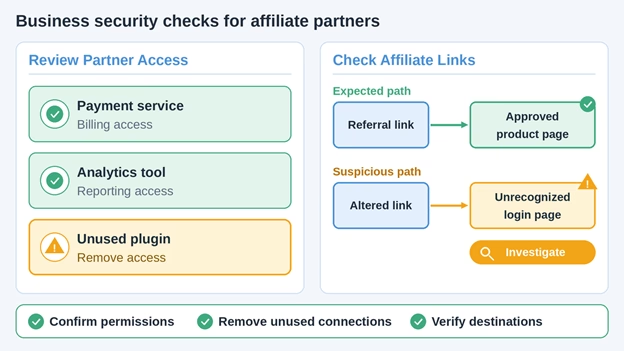
Payment providers, plugins, analytics services, and affiliate solutions can compromise your security by enabling third-party access to your data. Always examine what information an application has access to before granting permissions.
Review Partners and Connected Tools
Ascertain the information that the service collects, how the service safeguards this information, and incident reporting procedures. Eliminate any unneeded integrations and cancel their credentials. Designate someone to review permissions as the company evolves.
Monitor Links and Partner Access
Affiliate marketing security best practices involve scrutinizing the affiliates’ referrals and unauthorized alteration of the links. A hacked account can lead to draining the traffic towards a fake page.
Control who can access payout details and destination addresses. Monitor affiliate activity and close accounts when they are no longer needed.
Maintain Confidence During an Incident
Cybersecurity affects customer trust when a security problem occurs. A clear response tells customers what happened without making claims that cannot be confirmed.
Ensure containment of the breach, retention of any relevant information, and an investigation as to what was compromised. The revocation of any accounts or data access that may have been compromised is not enough if there is reason to believe that an intruder has ongoing access or an active token.
Communication should include the following:
- What has been confirmed and what remains uncertain.
- Which users or services are affected.
- What actions affected people should take.
- When the next update will be provided.
A precise, correct update is more helpful in building trust than asserting that everything is secure before checks are finished.
A Practical Security Checklist
Use this checklist to delegate responsibilities and see gaps. Protection of customer data and security of SaaS accounts needs to be reviewed as tools, staff, and partner relationships evolve.
| Area | Action | Reason |
| Account access | Implement multi-factor authentication and keep recovery information up to date | Adds extra protection for the account |
| Phishing | Double-check before taking any action | Helps detect phishing attempts |
| Customer data | Limit access to customer data and keep backups | Adds protection for customer data |
| Partner access | Remove inactive or unnecessary connections | Helps limit access to the system |
| Incident response | Establish roles and responsibilities for handling security incidents | Supports clear communication among team members during an incident |
Conclusion
Cybersecurity and customer trust are closely linked to the decisions made routinely: payment changes verification, access limitation, integration reviews, and incident transparency. SaaS security and protection of affiliates require owners to ensure that the above-mentioned points are under control. It is possible to begin with accounts and connections that may cause the most damage and then move to fixing the discovered issues. This way, there is a solid foundation for trust and transparency that can be relied on by customers and partners.
Leave a Reply