

A self-defense course for your online life.
Todays post will focus on how scammers and hackers trick humans into revealing sensitive information about ourselves with the majority of times without us even noticing.
This educational social engineering attack article aims to teach you how to defend yourself against the enemy whose intent is to use your sympathy and humanity against you.
* This article will discuss topics that can bring harm to people and society. Please do not attempt to replicate these methods. No instructions will be given on how to replicate it. This article is for educational purposes only.
Let’s dive right in!
Today’s Goals
I will teach you:
- What social engineering is.
- Why social engineering attacks are so effective.
- The principle of zero trust.
- How ethical hackers fight crime.
- The psychology behind the scam.
- The methods hackers use to steal your personal information in 2026.
- Real world scenarios.
- Which resources you can use to protect yourself, your family and friends.
Contents
- A self-defense course for your online life.
- Today’s Goals
- Contents
- 1. What is social engineering?
- Definition:
- 2. Why are social engineering attacks so effective?
- What is different in 2026?
- How AI is used in social engineering attacks.
- The scammer wants:
- 3. The priniciple of zero trust
- ‘Never trust, always verify’
- 4. Ethical hackers getting back at scammers.
- 5. The psychology of the scam.
- The shortcuts scammers use on you to make the wrong decisions.
- Social engineering attacks in 2026 are tailored for you specifically.
- The cold call vs the warm call.
- The stress test.
- 6. The methods used by scammers to target you.
- Quishing – QR code phishing
- What is quishing?
- The ‘ClickFix’ attack
- Kidnapped: Escalating the scam.
- 7. Defensive strategies: Upgrading the human firewall.
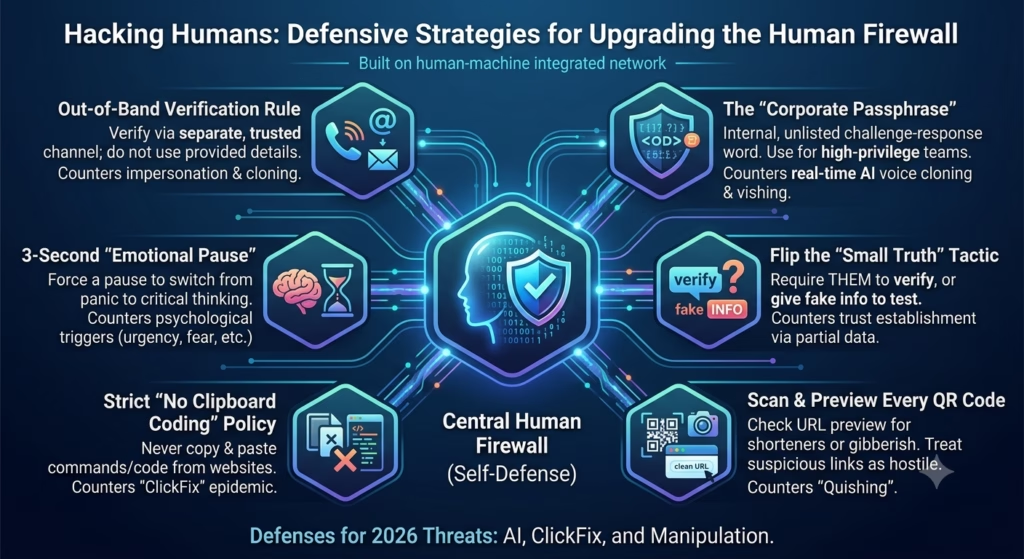
- Verify via a secure and trusted channel.
- Implement a private passphrase.
- The emotional pause.
- Flip the small truth tactic.
- Clean your clipboard.
- Scanning QR codes.
- 8. Additional Resources.
- 9. Summary
- 10. Your feedback.
- Share this article.
- Other Articles & Topics
1. What is social engineering?
It is not a course you can complete and receive a degree in and it has nothing to do with the improvement or engineering of social sciences.
Definition:
Social Engineering is the art of manipulating people so that they give up confidential information or access to systems (physical and online) that are difficult to exploit with traditional hacking.
In the cybersecurity profession we refer to social engineering attacks as either the penetration testing of physical brick and mortar companies or exploiting people instead of computers to give up or access sensitive information.
This can be done via email phishing or gaining access to a company’s offices after talking to a receptionist that felt sympathy for you after you told them that you were just in a car accident and lost your phone, so they give you access to their VoIP phone and computer to “call your insurance company” when neither of these facts are true. These are just two examples of social engineering attacks, and they can get more complex.
For today’s intent, I will only cover a few of the major attack methods. If you would like to learn more about the types of attacks in-depth, let me know in the comments.
2. Why are social engineering attacks so effective?
When you learn about the basics of cybersecurity, one phrase gets mentioned often: ‘People are the weakest link in information security.’
Securing information methods today, compared to 10 years ago are more complex, intricate and more secure. A black hat hacker needs to have more knowledge of an ever changing security landscape to be able to effectively and subtly break in to a computer system without setting off alarms that administrators can immediately defend.
People on the other hand, are easier to ‘hack’ than computer systems because the people doing the hacking, are also human and know how fellow human beings think. They focus everything on the weaknesses we as humans have. Greed, curiosity, personal gain are just a few things that scammers and black hat hackers exploit to get to their prize; your personal information, and eventually your identity and personal funds, to name a few.
You’d think that with the ever growing use of AI, that breaking into computer systems have become easier. Humans are still the weakest link in information security.
A computer system has no conscience or desire, and offering it a $1000 return on investment within 24 hours by only investing $50, won’t trigger curiosity as it would with humans. But, with the increased use of automated and self-governing AI agents whose sole purpose is to make money for its user, we’ll have to see how an AI agents react to such baiting methods in the future.
What is different in 2026?
What if I told you there is a plugin or add-on that you can get for free, no subscription required, that will help you improve your life without complaining and will do everything in its power to appease you?
Depending on who you speak to, the debate arises how ‘free’ such a service really is.
It is not difficult to imagine AI accomplishing anything you ask it to as a side-kick or assistant that is constantly at your side. The debate of how AI should be governed is still continuing albeit at a slower pace of its adoption and setting aside rules it needs to follow. Rules that human beings follow naturally in order to co-exist with each other.
There are many known AI models from major companies that millions of people have used. But, there are also models that are freely available with no censoring and does not adhere to rules, like humans obeying the laws of their country to maintain peace and stability.
These models have been altered to reply with an answer even when the user asks questions such as how to build an explosive device, where to order drugs or compromised credit cards on the dark web. These models can be run on a local computer without being monitored by an authority figure that can block the prompt request if it will reveal harmful information.
How AI is used in social engineering attacks.
Let’s go back in time before AI was such an effective tool.
Put yourself in the shoes of a black hat hacker. You are trying to exploit a human being into giving away enough of their personal information so that you can clone their identity and apply for a bank loan as if you were that person. Then afterwards, you’ll disappear with the money, leaving the person whose identity you’ve stolen to try and recover their life from the sudden chaos they didn’t even know they were a part of.
To gather enough information about them, without them knowing your malicious intent, you had to find information about them such as their address, ID number, credit score, signature, passwords and credentials etc.
If you are new to this, where do you even start gathering this information? There’s no one to help you or train you to do this, and scrolling on forums on the dark web leaves you hesitant to trust the people posting the potential tools and sites that can be used gather the information.
Now, let’s bring in AI; you can acquire models on the clear net without having to look suspicious or give reasons for your intent on its use. The AI, unlike humans, won’t give a away your plans or alert the nearest police station that you are about to commit a crime. Plus, it also has knowledge beyond your scope on how to gather information about your target.
What would’ve have taken days or months, can now be done in a few minutes or even less. When you are tired or lack the knowledge, the AI will continue diligently to fulfill your request.
The scammer wants:
- Your data – credentials and personal information.
- Access – online profiles, banking applications etc.
- Money – transfers, gift cards, crypto etc.
3. The priniciple of zero trust
The Zero Trust security model is a “never trust, always verify” cybersecurity strategy that treats every access request as a potential threat, regardless of where it originates.
Adapting the concept of zero trust to social engineering, here is how you can apply it to protecting your digital identity.
‘Never trust, always verify’
Anyone could be on the other side of that call, email or SMS you received. With commitment and motive, a scammer can fake the identity of any person or company. Spoofing a phone number or email is a lot easier than you may think.
Solution: When you are uncertain of the identity of the person or company that is contacting you, politely decline their call or leave the email unread and use official channels to contact the person or company, asking them if the message you received is legitimate.
If the message or person asks you to use a number or email they provide, again, politely decline them and determine the correct contact details through official channels like the company website.
If you are still unsure, ask someone you trust to either make contact or verify the details you have been given are correct.
I will discuss which red flags to check for when you should become wary of the person or the message.
Spoofing: The act of impersonating a legitimate entity by falsifying data, such as email addresses or phone numbers, to gain unauthorised access or deceive individuals into sharing sensitive information. It is commonly used in phishing attacks and can take various forms, including email spoofing, caller ID spoofing, and website spoofing.
4. Ethical hackers getting back at scammers.
The scammers don’t always get to win, ethical hackers also get to fight back. Here’s a funny video on that front.
5. The psychology of the scam.
Let’s learn how scammers use psychology to take control of your emotions and keep you in a state where you are unable to focus and make the right decisions.
How to hijack the mind: Attackers want to keep you in a state of high emotion so you don’t stop to think.
Here’s a quick question: Which other profession keeps you in a state of high emotion or triggers you to think about a specific product or service?
The answer is, copywriters and telemarketers. And not even some of these telemarketing agencies are acting legally in obtaining your personal information to target you.
The shortcuts scammers use on you to make the wrong decisions.
I am going to share a few statements with you. Read each one as if it was targeted at you and you received the message in an sms or email. Then think about how it makes you feel.
- “Fraud detected on your bank account. Act in the next 1 hour or your account will be frozen.” – Urgency
- “There is a warrant out for your arrest for unpaid taxes. The sheriff is on the way.” – Authority
- “I’m calling from Head Office/The Police/SARS. You have missed your court hearing.” – Fear
- “You’ve won a R1,000 Amazon gift card! It will expire today.” – Curiosity/Greed
- “This is Interpol. We have recorded evidence of you watching children being abused.” – Fear
- “I’m calling from tech support to help you with those error messages you’ve been seeing on your phone. Please download this application to allow me to connect to your phone.” – Helpfulness
Consider the last statement. What if the person that hacked your phone, causing error messages to appear, suddenly calls you to fix the problem? When it is their attempt to push for the final step in having full control over your phone.
Social engineering attacks in 2026 are tailored for you specifically.
With the help of AI, finding information about you online have never been easier, especially the bigger your online digital footrpint is.
Hackers can now gather information about you that can be used to profile you and alleviate the hesitation to trust them when they offer small pieces of information that compels you to believe them.
Information that can be gathered inlcude holidays you have taken, the name and type of pet you have as well as the job role you are currently working in. They can use all this to personalise an attack specially aimed at you.
Using information that may appear non-sensical, they can convince you that they are someone to be trusted.
The cold call vs the warm call.
Imagine you are receiving a call from company XYZ.
The person on the other end of the call doesn’t call you by your name, immediately offers their product or service to you. You immediately realise that you are one of many people thay have called today and that they are likely reading from a script they received after finishing training.
Now imagine you receive a similar, but this time the person calls you by your name and asks you about the recent holiday you’ve taken and how your pet dog Fifi reacted after you came back. You ask them their name, and you don’t recognize it, so they reply that you met them at a friend of yours birthday party, naming the exact day it happened and what you wore that day. For fear of awkwardness, you agree with them. This conversation continues until the person on the other end of the call have withdrawn personal information from you without you being the least bit hesitant.
The more information a scammer or hacker has of you, the easier it is to get them to trust you.
The stress test.
Have you ever lost your keys while trying to pitch up to a meeting you are already late for? Your mind goes blank and trying to remember, just makes you forget even more. This is the same state that the scammer is trying to keep you in.
This is a quick solution to keep in mind when you spot the red flags of a scammer.
The immediate step is to just stop! Take a deep breathe and focus on your breathing until you are calm. Block everything else out, and then return to the matter at hand. Some of you may be thinking: ‘Who would’ve thought following the first steps in meditation is the solution?’
Well, having your senses back to normal makes you a better judge of character than when you were stressed and most likely to commit to something you’ll regret later.
6. The methods used by scammers to target you.
In this section we will dive into the methods hackers and scammers use to take advantage of your trust in technology.
Quishing – QR code phishing
For those of you who don’t know, a QR code looks like this. It can be in different colours or shapes, but the concept is always the same. There will always be three large squares at 3 of the corners of the QR code with smaller squares that ‘dot’ the inside of the image.
What is quishing?
Here is the scenario:
You are going to your favourite restaurant, but instead of getting a printed menu, to waiter points to a QR code neatly displayed at the center of your table. They ask you to scan the code and order via the page displayed on your phone or they will come and take your order when you are ready.
Unbeknownst to you, a scammer has placed another QR code over the legitimate restaurant’s QR code. You scan the QR code and you open the page to the restaurant’s menu. Nothing seems to be out of the ordinary, so you take your time to peruse what is available to eat and drink.
So, how exactly did the attack take place?
In this scenario, the QR code you scanned was the vehicle that led you to a legitimate looking site of the restaurant that the attacker copied exactly pixel by pixel, letter by letter. Except, you opened a page to their personal website that just happened to look like the restaurant’s page. While you were browsing the menu, they site triggered a hidden download that gave the attacker access partial or full access to your phone.
This secondary attack is called a drive-by download. All you have to do is open the page to that site for it to trigger.
The ‘ClickFix’ attack
With this attack, you essentially become the hacker of your own device, giving access to the attacker. This hack fools you into becoming the hacker’s accomplice, uknowingly giving them access to your computer through your own actions.
Here is the scenario:
A legitimate pop-up appears on your screen using the logo of a known company like CloudFlare or Microsoft, telling you that an error has occurred on your computer and that you can trust ‘them’ by following the instructions mentioned below.

The example in the image states that you only have to press two key combinations for the fix to take effect. So, you press the keys and the ‘Run’ window appears and the command that will be executed in the text box. After you press enter, a quick flash of another window appears then disappears and nothing else happens.
You can assume that everything you did fixed the issue and should be resolved now.
Except, you inadevertently ran a malicious script on your computer, allowing the hacker to remove certain security measures using your administrative account credentials and also downloading malicious software that gives the hacker administrative access to your computer.
Solution: Do not press any key combinations or execute code on your computer that you are unsure what action it performs.
Kidnapped: Escalating the scam.
The next example is the most difficult to discuss, since it confronts some of you with something close to your heart; your children. The scammers operating this crime, have absolutely no sympathy for the pain they put you through.
Imagine you get a call from your child, parents, sibling or friend, telling you in a panicked voice that they have been kidnapped and the kidnappers are demanding ransom money in return. Except, in this situation none if it is true. A cloned voice recording is playing on the other side of the call.
They use a combination of vishing (voice phishing), voice cloning and a spoofed phone number to put you in a state of high panic that overwhelms your sense of focus. Watch the video below to fully comprehend the scenario.
This is a real-world scenario that occurred several years ago, but is not something that will dissipate any time soon, since it’s effect on the victim is causes them to become emotional and panicked.
This scam is in my opinion the scariest to be put through, because you cannot be certain if the person is actually in danger or not.
Solution: In this situation it is of the utmost importance to remain calm and also not to call out the caller of the call being falsified.
Take a deep breath and let your sense of focus return while still keeping the call active. Try to discover what the caller wants and avoid putting the kidnapped person in a position of greater harm.
It is also important that while you are busy with the call, to get anyone in the vicinity of you to call the person in danger and call the local authorities immediately. This should be done without alerting the kidnapper to what you are doing, as it can increase the danger the kidnapped person is in, even when it is a falsified and a voice cloned call.
Once the authorities have been notified, let them guide you through the steps that can be taken next.
7. Defensive strategies: Upgrading the human firewall.
This section is the most important of all to read through. Here I will discuss what you can do to defend not just yourself but everyone around you against online scams and threats when you are the target of a scammers or hackers’ entry point to your personal life.
Verify via a secure and trusted channel.
Whenever a red flag lights up about a message or call you received except in the scenario where I discuss the kidnapping of a person, end the call immediately or do not open or reply to the message.
Contact the company or organisation directly by looking up their contact details online and let them verify the details of the message. If you wish to go further, you can also look up their fraud, scam or crime helpline and submit a report via that channel.
Implement a private passphrase.
We live in a society where the majority of us already know that the password we use on a daily basis are no longer strong enough from being cracked. Some of you are already using passphrases to log into your accounts. Those that do, know that memorising several words for each account you have can be a real hassle sometimes.
This does not however excuse you from getting lax with your personal security, especially that of your family.
Have a family meeting to discuss a passphrase that can be easily remembered. When you do get a call from someone in your family who states that they are in danger, ask them for the pass phrase. When they use it, you can know the call comes from the actual person and it is not a cloned voice.
I would take it a step further and if your family is up for it, set up an additional passphrase. In this case, one that notifies you that the person is okay and one that they can use notifies you that they are in imminent danger.
Here is an example: Your grandmother calls you to tell you she has been kidnapped and the kidnappers are demanding a ransom. You ask her for the passphrase, and if it is not a cloned voice she will reply with the agreed upon passphrase: “The posies are lovely today.”
The passpharase should be exactly that, something that does not deliberately give away the danger the person is in.
The emotional pause.
Scammers will try to constantly keep you in a state of high-emotion. Once you realise that you cannot think clearly, stop and take a deep 3 second breath and exhale. Keep doing it until you feel more calm and focused.
Flip the small truth tactic.
We are living in times when the call you receive can no longer be trusted to be from the source they claim to be. To manage a suspicious call, let the operator tell you something about yourself that shoudn’t be common knowledge. Let them give you partial information of your home address or an account number related to your profile.
If they are the ones calling you, you can certainly give them some false information about yourself, as a test, they should notice that it is not correct. If they accept it, they aren’t calling you from the legitimate organisation.
Clean your clipboard.
Computers are not as easily comprehended today as they were a decade ago. If you are going to copy and paste something, make sure you understand what you are copying and why your pasting it.
In other words, if what you are instructed to copy, looks like gibberish and it’s pasted in a space or application you know nothing about, don’t do it.
Scanning QR codes.
QR codes can lead you to unsavoury sites, so be careful to check the link it will open on your phone or device.
When scanning a QR code your device should first display the link to the site before opening it. Carefully read the link and check whether it will send you to the intended site.
Look for the business name in the link and, if you know the full website address of the business it will serve as an extra step to avoid unsavoury sites. Rememeber, that hackers and scammers can make it look like the correct business link by altering the name and making some spelling errors to make it look legitimate by just quickly scanning it with your eyes.
Additionally, if the link looks like gibberish, do not open it.
8. Additional Resources.
You can use these resources to improve your online security. Some are free and some require a subscription.
- DMASA (Direct Marketing Association of South Africa) [Free] – South Africa only. This organisation removes your personal and contact information from databases used to cold call people. When you register, it takes about six weeks for your personal information to be removed.
If after six weeks, anyone cold calls you without your express permission, they can be fined heavily for breaking the POPI Act. - Have I Been Pwned [Free] – This site allows you to check whether your login credentials (username, password, phone number, address and more) have been exposed in a data breach, that is specifically linked to your email address.
I would recommend that you confirm your email and linked accounts are safe as soon as possible, since this is the fastest way a hacker can wreak havoc on your life. - NordVPN [Paid Service] – A VPN (Virtual Private Network) can be described like this: Imagine you are driving your car from point A to B in a dark tunnel that only you have access to. Nobody knows where you are in the tunnel or when you are using it. You can experience the same with your internet usage.
A VPN protects you from anyone (hackers, search engines and even your internet service provider) from discovering how you use the internet. In other words, all of your internet traffic is encrypted an protected.
Do you want to access your bank account securely, or stream your favourite shows that are not accessible in your country? Then using a VPN will help. NordVPN is the best VPN there is, not just in my opinion, but proven over the years consistently.
You can read more and support my website indirectly by reading about NordVPN here. - Hang Up [Free] – This application automatically blocks spam and scam calls once activated. No ads, no fluff, just doing what it is intended for. This is another innovative and simple tool developed by NordVPN.
- Delete Me [Paid Service] – This platform will remove your personal information from information brokers. It’s like doing a spring clean on your online presence, making it more difficult for hackers and scammers to discover information about you.
- Firefox Browser [Free] – Unlike other browsers (Chrome, Edge etc.), Firefox is focused on keeping your personal information safe and secure while using it. I will not recommend any other browser to anyone.
It is also the go-to browser for ethical hackers who work with sensitive information all the time. - DuckDuckGo [Free] – You cannot quit using Chrome or Edge browsers without also quitting their search engines. DuckDuckGo is the antithesis of search engines like Google. This is what they are all about:
Protection. Privacy. Peace of mind. - Browser Add-ons [Free] – These are some of the essential Firefox browser add-ons that makes a very big difference in keeping you safe while surfing the internet. Take note, that they sometimes cause a site to not operate properly, since they do focus on disabling background settings that keeps the site from tracking you. If you do trust the site, you can switch them off for that specific site.
- Canvas Blocker
- DuckDuckGo Privacy Essentials
- Ghostery Privacy Adblocker
- PopUpOFF
- Privacy Badger
9. Summary
The most secure computer system in the world is the one that is switched off, not in use
and not connected to the internet.
The most secure person is the one who has no contact with the outside world, have no friends or family and can stay secluded permanently.
Therefore…
No single computer or person’s information is secure.
10. Your feedback.
Do you have any questions? Have you been scamme dor hacked? Please share your story with us and what articles you would like to read here on Cyber Sai.
Share this article.

Leave a Reply